- 전체 파일 경로
- 새로운 프로젝트 생성
- pom.xml에서 필요한 의존 객체 추가
- DB에 테이블 생성
- board DTO 생성 (테이블에 데이터 담는 역할)
- board DAO 생성 (데이터베이스 조작 역할)
- Mapper 파일과 mybatis-config 파일 생성
- root-context.xml 에 설정 파일 3개 추가
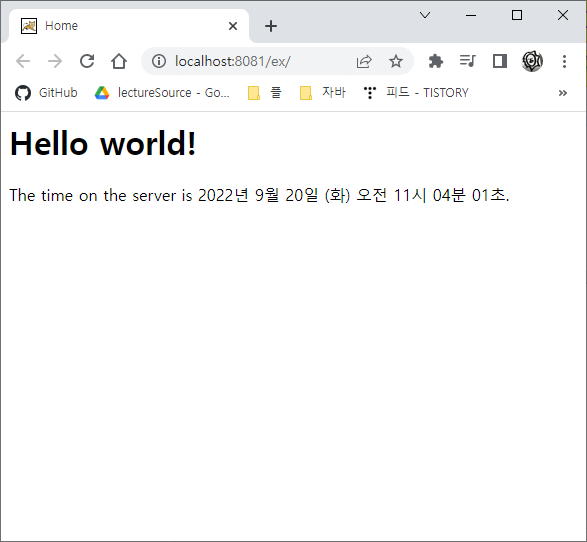
- Tomcat 서버 구동 화면
1. 전체 파일 경로

2. 새로운 프로젝트 생성
참고 링크 : https://marah.tistory.com/21
[Spring] 프로젝트 생성 및 Tomcat 서버 설정
1. 스프링 레거시 프로젝트 생성 2. 스프링 MVC 구조 살펴보기 3. 톰캣 서버 설정하기 1. 스프링 레거시 프로젝트 생성 - 프로젝트 이름은 마음대로 - Spring MVC Project 선택 - 보통 도메인을 거꾸로
marah.tistory.com


3. pom.xml 에서 필요한 의존 객체 추가
- 자바 버전 설정 (버전이 맞지 않으면 404 에러 발생)
<properties>
    <java-version>1.8</java-version>
    <org.springframework-version>4.3.5.RELEASE</org.springframework-version>
    <org.aspectj-version>1.6.10</org.aspectj-version>
    <org.slf4j-version>1.6.6</org.slf4j-version>
</properties>
- 데이터베이스 의존 객체 추가
<dependency>
    <groupId>com.oracle.database.jdbc</groupId>
    <artifactId>ojdbc8</artifactId>
    <version>18.3.0.0</version>
</dependency>
<dependency>
    <groupId>org.springframework</groupId>
    <artifactId>spring-jdbc</artifactId>
    <version>4.3.5.RELEASE</version>
</dependency>
<dependency>
    <groupId>org.mybatis</groupId>
    <artifactId>mybatis</artifactId>
    <version>3.4.1</version>
</dependency>
<dependency>
    <groupId>org.mybatis</groupId>
    <artifactId>mybatis-spring</artifactId>
    <version>1.3.0</version>
</dependency>
* 필요한 레파지토리 검색 사이트 (더보기)


4. DB에 테이블 생성
참고 링크 : https://marah.tistory.com/24
[Spring] Oracle DB 설치 및 SQL developer 초기 설정
Oracle Database Express Edition 18c 다운로드 Oracle SQL Developer 다운로드 압축 해제 후 설치 SQL 로그인 계정 생성하기 계정 권한 주기 로그인 확인하기 1. Oracle Database Express Edition 18..
marah.tistory.com
5. board DTO 생성
- 테이블에 데이터를 담는 역할
import java.util.Date;

public class BoardDto {
	private int bno;
	private String title;
	private String content;
	private String writer;
	private Date regdate;
	private int viewcnt;
}
- Getter, Setter 자동 생성


- toString 자동 생성


- DTO 작성 완료

6. board DAO 생성
- 데이터베이스를 조작하는 역할
import java.util.List;

public interface IBoardDao {
	public void create(BoardDto dto) throws Exception;
	public BoardDto read(int bno) throws Exception;
	public void delete(int bno) throws Exception;
	public void update(BoardDto dto) throws Exception;
	public List<BoardDto> listAll() throws Exception;
}
7. Mapper 파일과 mybatis-config 파일 생성
boardMapper.xml 작성
- DAO에 생성한 메서드 이름과 반드시 같아야 함
<?xml version="1.0" encoding="UTF-8"?>
<!DOCTYPE mapper
PUBLIC "-//mybatis.org//DTD Mapper 3.0//EN"
"http://mybatis.org/dtd/mybatis-3-mapper.dtd">

<mapper namespace="com.human.dao.IBoardDao">
<insert id="create">
insert into tbl_board(bno,title,content,writer)
values(seq_board.nextval,#{title},#{content},#{writer})
</insert>
<select id="read" resultType="BoardDto">
select * from tbl_board where bno=#{bno}
</select>
<delete id="delete">
delete from tbl_board where bno=#{bno}
</delete>
<update id="update">
update tbl_board set title=#{title},content=#{content} where bno=#{bno}
</update>
<select id="listAll" resultType="com.human.dto.BoardDto">
select * from tbl_board order by bno desc,regdate desc
</select>
</mapper>
- mybatis-config.xml 작성
<?xml version="1.0" encoding="UTF-8"?>
<!DOCTYPE configuration
  PUBLIC "-//mybatis.org//DTD Config 3.0//EN"
  "http://mybatis.org/dtd/mybatis-3-config.dtd">
<configuration>
	<typeAliases>
		<package name="com.human.dto"/>
	</typeAliases>
</configuration>
8. root-context.xml 에 설정 파일 3개 추가
<bean class="org.springframework.jdbc.datasource.DriverManagerDataSource"
      name="dataSource">
    <property value="oracle.jdbc.driver.OracleDriver" name="driverClassName"/>
    <property value="jdbc:oracle:thin:@localhost:1521:xe" name="url"/>
    <property value="c##human" name="username"/>
    <property value="human" name="password"/>
</bean>

<bean id="sqlSessionFactory"
      class="org.mybatis.spring.SqlSessionFactoryBean">

    <property name="dataSource" ref="dataSource" />
    <property name="configLocation"
                value="classpath:/mybatis-config.xml"></property>
    <property name="mapperLocations"
            value="classpath:mappers/**/*Mapper.xml"></property>
</bean>

<bean id="sqlSession" class="org.mybatis.spring.SqlSessionTemplate"
        destroy-method="clearCache">
    <constructor-arg name="sqlSessionFactory"
                    ref="sqlSessionFactory"></constructor-arg>
</bean>
- 파일 하단의 Namespaces에서 context 체크

9. Tomcat 서버 구동 화면
'Language > Spring' 카테고리의 다른 글
| [Spring] 게시판(Board) CRUD 구현하기 (2) | 2022.09.20 |
|---|---|
| [Spring] EL과 JSTL 정의 및 예제 (1) | 2022.09.16 |
| [Spring] SQL 테이블 생성 및 데이터 입력, 조회 (0) | 2022.09.15 |
| [Spring] Oracle DB 설치 및 SQL developer 초기 설정 (0) | 2022.09.15 |
| [Spring] 컨트롤러(@Controller) 작성 및 살펴보기 (0) | 2022.09.14 |